Page 39 of 178
Re: Pattern viewer for forum threads
Posted: July 11th, 2019, 1:51 pm
by toroidalet
The draw functionality is a little buggy, for example after drawing around clicking buttons will draw a line to them rather than triggering them. Also, you can do random fills on view-only patterns.
Re: Pattern viewer for forum threads
Posted: July 11th, 2019, 5:41 pm
by rowett
toroidalet wrote:The draw functionality is a little buggy, for example after drawing around clicking buttons will draw a line to them rather than triggering them. Also, you can do random fills on view-only patterns.
The next build makes selections respect VIEWONLY mode. Thanks for reporting!
I can't reproduce the drawing behaviour you're seeing. Do you have a set of steps I can try that shows the issue? Also please confirm which platform you're on.
Re: Pattern viewer for forum threads
Posted: July 12th, 2019, 5:02 am
by rowett
Build 365 is now live on the
Forums and
LifeWiki
Please note: you will need to
refresh your browser to use the new build (Ctrl-F5 on Chrome)
Fixes since the last released build:
- selections now respect [[ VIEWONLY ]]
- fixes for undo/redo during playback
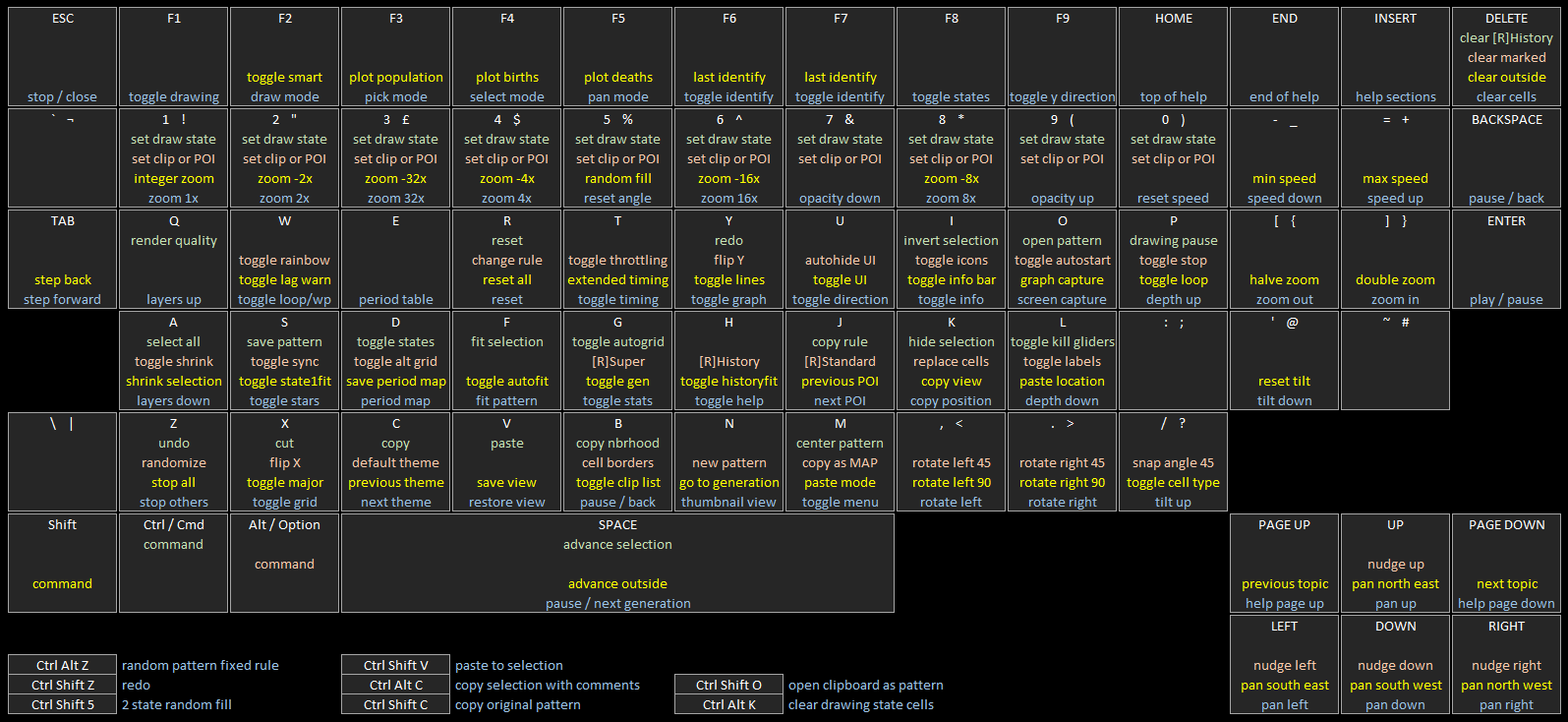
The updated hotkey map detailing the LifeViewer keyboard controls is
here.
Comments, feedback, suggestions and bug reports welcome!
Re: Pattern viewer for forum threads
Posted: July 18th, 2019, 8:46 am
by rowett
Build 366 is now live on the
Forums and
LifeWiki
Please note: you will need to
refresh your browser to use the new build (Ctrl-F5 on Chrome)
Enhancements since the last released build:
- improved selection and paste boxes for offset-square grid and hexagonal grid
Fixes since the last released build:
- create and clear selection were missing from undo/redo
- horizontal and vertical flip were not working for paste
The updated hotkey map detailing the LifeViewer keyboard controls is
here.
Comments, feedback, suggestions and bug reports welcome!
Re: Pattern viewer for forum threads
Posted: July 19th, 2019, 3:44 am
by rowett
Build 367 is now live on the
Forums and
LifeWiki
Please note: you will need to
refresh your browser to use the new build (Ctrl-F5 on Chrome)
Enhancements since the last released build:
- improved selection and paste boxes for triangular grid
- improved performance for hexagonal grid selection display
Fixes since the last released build:
- paste bottom left and bottom right positions were the wrong way round
The updated hotkey map detailing the LifeViewer keyboard controls is
here.
Comments, feedback, suggestions and bug reports welcome!
Re: Pattern viewer for forum threads
Posted: July 19th, 2019, 3:45 am
by rowett
muzik wrote:Can the selection box be made to fit the grid better when used on hexagonal or triangular patterns? It can be hard to tell what is selected and what is not.
This has now been implemented in Build 367. Thanks for the suggestion!
Re: Pattern viewer for forum threads
Posted: July 26th, 2019, 12:23 pm
by rowett
Build 368 is now live on the
Forums and
LifeWiki
Please note: you will need to
refresh your browser to use the new build (Ctrl-F5 on Chrome)
Fixes since the last released build:
- fixed POPUPWIDTH validation
Code: Select all
x = 8, y = 14, rule = B2a3ir4i5e/S3i4et5e:T240,16
obo$o5bo$o4b3o$o5bo$o5bo$o4b3o$o5bo$o5bo$o4b3o$o5bo$o5bo$o4b3o$o5bo$ob
o!
[[
RLE clear bo$3o$bo$bo$3o$bo$bo$3o$bo$bo$3o$bo!
PASTET 93
PASTEMODE XOR
PASTE clear 5 1
PASTET 8315
PASTE clear 5 1
PASTET 8318
PASTE clear 5 1
POPUPWIDTH 976 ZOOM 4 ]]
The updated hotkey map detailing the LifeViewer keyboard controls is
here.
Comments, feedback, suggestions and bug reports welcome!
Re: Pattern viewer for forum threads
Posted: July 30th, 2019, 8:42 am
by rowett
Build 369 is now live on the
Forums and
LifeWiki
Please note: you will need to
refresh your browser to use the new build (Ctrl-F5 on Chrome)
Enhancements since the last released build:
- Performance improvement for cell history and longevity
- Performance improvement when ZOOM < 1
- THEMEs without history (Mono, Inverse, Golly, MCell, Caterer and Life32) and PASTE commands now have improved performance at STEP sizes > 1
The updated hotkey map detailing the LifeViewer keyboard controls is
here.
Comments, feedback, suggestions and bug reports welcome!
Re: Pattern viewer for forum threads
Posted: July 30th, 2019, 7:38 pm
by muzik
This is hard to explain (and it's midnight so that won't help exactly), but when selecting cells on the hexagonal grid, the selection appears as a sort of rhombus. Since there are three possible rhombuses that can be traced out this way in a hexagonal grid, could they be added as alternate selection options somehow?
Re: Pattern viewer for forum threads
Posted: July 31st, 2019, 5:57 am
by rowett
muzik wrote:This is hard to explain (and it's midnight so that won't help exactly), but when selecting cells on the hexagonal grid, the selection appears as a sort of rhombus. Since there are three possible rhombuses that can be traced out this way in a hexagonal grid, could they be added as alternate selection options somehow?
At the moment all grid types (Square, Hexagonal, Offset Square and Triangular) use a "square" selection. I think I'll need hexagonal and triangular selections as well to make Rotate Selection and Flip Selection meaningful for non-Square grids. I'll put this on the backlog but it'll be a while.
Re: Pattern viewer for forum threads
Posted: July 31st, 2019, 7:29 pm
by muzik
That would be great. Can the "von Neumann selection" option also be considered?
Re: Pattern viewer for forum threads
Posted: August 1st, 2019, 2:43 pm
by rowett
Build 370 is now live on the
Forums and
LifeWiki
Please note: you will need to
refresh your browser to use the new build (Ctrl-F5 on Chrome)
Enhancements since the last released build:
- performance improvement when ZOOM < -2
- performance improvement for THEMEs without history and STEP size 1
- performance improvement for THEMEs without history when ZOOM < 1
- switching to a THEME without history clears history cells
Fixes since the last released build:
- not all menu items were being drawn locked when menu locked
The updated hotkey map detailing the LifeViewer keyboard controls is
here.
Comments, feedback, suggestions and bug reports welcome!
Re: Pattern viewer for forum threads
Posted: August 1st, 2019, 3:11 pm
by rowett
LifeViewer performance
I've created a simple benchmark to measure LifeViewer's performance. The benchmark uses a pattern created by Dave Greene for part of a
talk he gave at G4G13. The pattern has about 190,000 live cells and an initial bounding box of 5,673 x 2,923 and uses the standard Conway's Life rule.
The benchmark tests performance of running and displaying the pattern in four different ways:
- Using the Blues theme (which has cell history) and a ZOOM of -12 (so the whole pattern fits in the viewer)
- Using the Mono theme (which has no cell history) and a ZOOM of -12
- Using the Blues theme and a ZOOM of 1
- Using the Mono theme and a ZOOM of 1
To run the benchmark click
here (or perhaps right-click and "Open link in new window").
For the first 1,000 generations you'll see "Warming up" messages. This is to allow the Javascript engines in the various browsers time to optimize the routines.
After that each benchmark phase will run for 1,000 generations in the order above. When the benchmark is finished it will display the message "Complete:" followed by the average generations per second for each of the four phases.
For reference I ran the benchmark on my desktop machine:
- CPU i7-2600K @ 3.4Ghz
- Windows 10 Pro 64bit
The browsers tested were:
- Chrome 76.0.3809.87 (Official Build) (64-bit)
- Firefox 68.0.1 (64-bit)
- Opera 62.0.3331.99
- Edge 44.18362.1.0
Here are the results:

- benchmark600.png (57.56 KiB) Viewed 9728 times
On my machine Chrome is the winner and Edge gets the wooden spoon.
I'd be interested in results from other systems. If you get a chance then please run the benchmark and post your results here.
Re: Pattern viewer for forum threads
Posted: August 3rd, 2019, 3:37 pm
by rowett
I've created a new version of the benchmark which calculates and displays the results automatically. I updated the post above with the new details and results.
Please post any results on your own systems by replying to this thread. Please include details of your system: CPU, operating system and browser versions. Thanks!
Re: Pattern viewer for forum threads
Posted: August 3rd, 2019, 4:07 pm
by Ian07
Code: Select all
CPU: AMD FX-6300
OS: Windows 10 Home 64-bit

Firefox 68.0.1
Benchmark 1: 15 gps
Benchmark 2: 30 gps
Benchmark 3: 38 gps
Benchmark 4: 57 gps

Chrome 76.0.3809.87
Benchmark 1: 25 gps
Benchmark 2: 36 gps
Benchmark 3: 46 gps
Benchmark 4: 69 gps

Opera 62.0.3331.99
Benchmark 1: 24 gps
Benchmark 2: 34 gps
Benchmark 3: 44 gps
Benchmark 4: 62 gps
Re: [[ KILLGLIDERS ]] can not killing LWSS, why?
Posted: August 4th, 2019, 12:41 pm
by muzik
rowett wrote:Because currently it just kills gliders. Is there consensus on other spaceships it would be helpful to suppress?
I would say tlife ants, but I'm not sure if the common c/5 t might wreck anything.
Re: Pattern viewer for forum threads
Posted: August 5th, 2019, 11:48 am
by rowett
Ian07 wrote:Code: Select all
CPU: AMD FX-6300
OS: Windows 10 Home 64-bit

...
Great, many thanks - that's helpful information!
If you get a chance to run it again you should see some good improvements especially in Bench 1 (25%-50% faster) and Bench 2 (40%-50% faster). It also fixes the strangely bad result from Edge on Bench 1. My latest results are:

- benchmark600.png (66.93 KiB) Viewed 9614 times
Re: Pattern viewer for forum threads
Posted: August 5th, 2019, 1:22 pm
by rowett
Build 372 is now live on the
Forums and
LifeWiki
Please note: you will need to
refresh your browser to use the new build (Ctrl-F5 on Chrome)
Enhancements since the last released build:
- performance improvement for ZOOM < 1
- performance improvement for THEMEs without history
- new script command [[ TIME ]] to trigger timing at a waypoint
- waypoint messages can now use string substitutions #0 to #9 to display timing results as average frames per second
The updated hotkey map detailing the LifeViewer keyboard controls is
here.
Comments, feedback, suggestions and bug reports welcome!
Re: Pattern viewer for forum threads
Posted: August 6th, 2019, 5:41 am
by rowett
Build 373 is now live on the
Forums and
LifeWiki
Please note: you will need to
refresh your browser to use the new build (Ctrl-F5 on Chrome)
Enhancements since the last released build:
- performance improvement for THEMEs with history

- benchmark600.png (65.42 KiB) Viewed 9544 times
The updated hotkey map detailing the LifeViewer keyboard controls is
here.
Comments, feedback, suggestions and bug reports welcome!
Re: Pattern viewer for forum threads
Posted: August 6th, 2019, 7:35 am
by rowett
Here are the results from Safari on my iPhone 6S:
- Bench 1 - 36.0
- Bench 2 - 55.1
- Bench 3 - 50.3
- Bench 4 - 62.2
Re: Pattern viewer for forum threads
Posted: August 9th, 2019, 4:52 pm
by rowett
Build 374 is now live on the
Forums and
LifeWiki
Please note: you will need to
refresh your browser to use the new build (Ctrl-F5 on Chrome)
Enhancements since the last released build:
- performance improvement for next generation (excluding LtL/HROT)
- improved allocation speed for random grid

- benchmark600.png (66.6 KiB) Viewed 9341 times
Fixes since the last released build:
- population statistics were incorrect if stats were off and pattern had bounded grid
The updated hotkey map detailing the LifeViewer keyboard controls is
here.
Comments, feedback, suggestions and bug reports welcome!
Re: Pattern viewer for forum threads
Posted: August 10th, 2019, 11:32 pm
by rowett
Build 375 is now live on the
Forums and
LifeWiki
Please note: you will need to
refresh your browser to use the new build (Ctrl-F5 on Chrome)
Enhancements since the last released build:
- increased maximum viewer size to 4096x4096
- improved rendering to window speed
- Note: the benchmark measurement now includes final rendering time so scores will be lower
Fixes since the last released build:
The updated hotkey map detailing the LifeViewer keyboard controls is
here.
Comments, feedback, suggestions and bug reports welcome!
Re: Pattern viewer for forum threads
Posted: August 11th, 2019, 8:43 pm
by muzik
When selecting stuff on a triangular grid, borders appear, but only for the two diagonal directions. The grid option for triangular rules also shows the horizontal line far thicker.
EDIT: also, shouldn't Major be greyed out for hexagonal and triangular grids?
Re: Pattern viewer for forum threads
Posted: August 11th, 2019, 8:48 pm
by muzik
Also, it seems as though custom values for gridmajor intervals persist even when switching themes; note how changing the theme to mcell does not set it to 5:
Code: Select all
x = 9, y = 5, rule = B3/S23
$bo3b3o$b3o2bo$2bo!
[[ COLOR BACKGROUND 48 48 48 COLOR ALIVE 255 255 255 COLOR ALIVERAMP 255 255 255 COLOR DEAD 48 48 48 COLOR DEADRAMP 48 48 48 COLOR GRID 80 80 80 COLOR GRIDMAJOR 112 112 112 GRID GRIDMAJOR 10 ]]
Re: Pattern viewer for forum threads
Posted: August 12th, 2019, 4:36 am
by rowett
muzik wrote:When selecting stuff on a triangular grid, borders appear, but only for the two diagonal directions.
True. All grids currently use a "square" selection.
muzik wrote:The grid option for triangular rules also shows the horizontal line far thicker.
The grid lines are the same width and the same colour. A row of pixels often looks thicker/brighter than a diagonal line.
muzik wrote:EDIT: also, shouldn't Major be greyed out for hexagonal and triangular grids?
Yes, good spot. I'll fix this for the next build.