Page 32 of 178
Re: Pattern viewer for forum threads
Posted: March 19th, 2019, 5:13 pm
by Ian07
What happened to the copy function? Everything I try to copy instead gives me this and says "Copy complete" instead of "Copied to Clipboard":
Code: Select all
x = 20, y = 2, rule = B3/S23
10o4bo$13obob4o!
Re: Pattern viewer for forum threads
Posted: March 19th, 2019, 10:09 pm
by dvgrn
Ian07 wrote:What happened to the copy function? Everything I try to copy instead gives me this and says "Copy complete" instead of "Copied to Clipboard":
Code: Select all
x = 20, y = 2, rule = B3/S23
10o4bo$13obob4o!
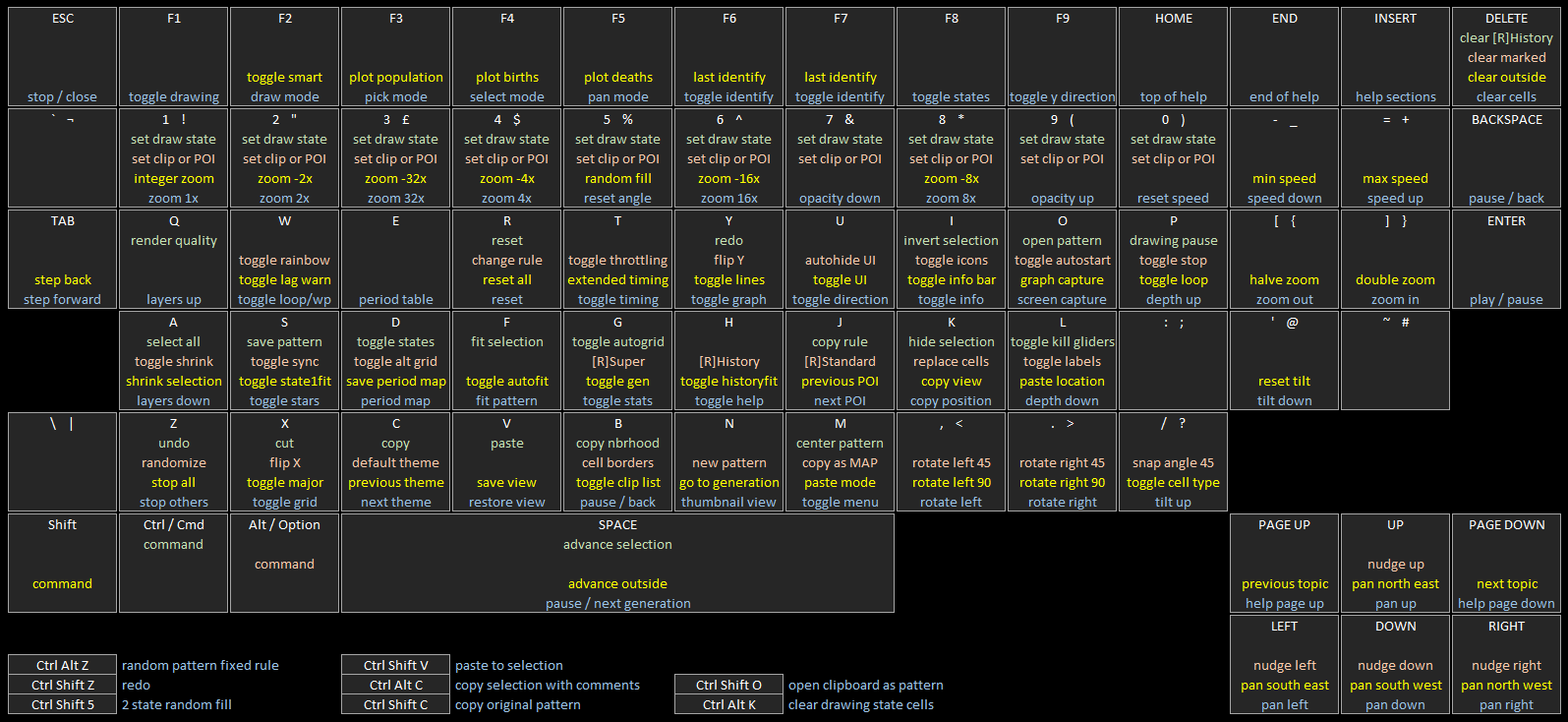
Hm, that doesn't match what I see. I mean, "Copy Complete" is now what you'll usually see -- there's a potential for a two-stage copy, where LifeViewer does the work and then you have to click a button to confirm. This is because Ctrl+C now copies the current generation that's in the viewer, not the original pattern -- and a pattern that has run for a while is often a lot more RLE than the original pattern. Ctrl+Shift+C copies the original pattern, and Ctrl+Alt+C copies the current pattern but also includes comments.
Is that strange two-line pattern what you get when you do Ctrl+C but paste the text here, directly into a code box in a message? It almost looks more like a couple of lines of text pasted into Golly, like it's actually an error message or some such.
Re: Pattern viewer for forum threads
Posted: March 19th, 2019, 10:50 pm
by wildmyron
Copy doesn't seem to do anything when I'm using Firefox - i.e. no change to the clipboard at all. I didn't report this initially because I thought it was due to the old version of Firefox I was using (v60.5.2 esr on Win10 x64). I've just tested with Firefox v65.0 on Linux and Copy fails there as well. Working fine on Chrome v67.0, Win10 x64.
Re: Pattern viewer for forum threads
Posted: March 20th, 2019, 1:23 am
by rowett
Ian07 wrote:What happened to the copy function? Everything I try to copy instead gives me this and says "Copy complete" instead of "Copied to Clipboard":
Code: Select all
x = 20, y = 2, rule = B3/S23
10o4bo$13obob4o!
Please let me know which operating system version and browser version you are using. Also please paste the output into a text editor so I can see any message.
Re: Pattern viewer for forum threads
Posted: March 20th, 2019, 1:30 am
by rowett
wildmyron wrote:Copy doesn't seem to do anything when I'm using Firefox - i.e. no change to the clipboard at all. I didn't report this initially because I thought it was due to the old version of Firefox I was using (v60.5.2 esr on Win10 x64). I've just tested with Firefox v65.0 on Linux and Copy fails there as well. Working fine on Chrome v67.0, Win10 x64.
I believe this is now fixed on Firefox. Please try
this test page and let me know your results:
- Let the pattern run until generation 100 (which it will do automatically)
- Click on the LifeViewer window and Press Ctrl-C and then wait while "Copying..."
- When prompted "Press Enter to complete copy"
- You will then see "Copy Complete"
- Now paste this copy into a text editor and you should see RLE that starts with "x = 4165, y = 4134, ..."
- Now click on the LifeViewer window and press Ctrl-Shift-C
- You should see "Copy Complete"
- Paste this new copy into a text editor and you should see RLE that starts with "x = 165, y = 134, ..."
EDIT: Fixed instructions
Re: Pattern viewer for forum threads
Posted: March 20th, 2019, 2:27 am
by wildmyron
rowett wrote:Please try
this test page and let me know your results:
- Let the pattern run until generation 100 (which it will do automatically)
- Click on the LifeViewer window and Press Ctrl-C and then wait while "Copying..."
- When prompted "Press Enter to complete copy"
- You will then see "Copy Complete"
- Now paste this copy into a text editor and you should see RLE that starts with "x = 4165, y = 4134, ..."
This works correctly (Fx 60.5, Win10 x64).
rowett wrote:[*]Now click on the LifeViewer window and press Ctrl-Alt-C
[*]You should see "Copy Complete"
[*]Paste this new copy into a text editor and you should see RLE that starts with "x = 165, y = 134, ..."[/list]
I think you meant Ctrl-Shift-C. In that case, yes, this also works correctly.
Re: Pattern viewer for forum threads
Posted: March 20th, 2019, 2:34 am
by rowett
wildmyron wrote:I think you meant Ctrl-Shift-C. In that case, yes, this also works correctly.
I did indeed. Thanks for checking!
Re: Pattern viewer for forum threads
Posted: March 20th, 2019, 9:35 am
by muzik
Can non-isotropic aliases be added? There's a few of them in the last few pages of this thread.
Re: Pattern viewer for forum threads
Posted: March 21st, 2019, 3:22 pm
by Ian07
When rewinding after a pattern dies out, the final spark toggles back and forth:
Re: Pattern viewer for forum threads
Posted: March 21st, 2019, 5:16 pm
by muzik
Will rotating hexagonal grids ever be supported? I've wanted the option to have hexagons lying flat, as they are on the wiki, instead of with a vertex pointing down.
---
Implementing a triangular grid preliminarily before adding in actual triangular rules, just so we can see how it would work and how it would handle pattern RLEs initially drawn on a square grid, could be helpful in preparation. If triangular rules will be handled using 2 states instead of 4 (which is preferable), then this could be the triangular Moore neighbourhood:
Code: Select all
x = 5, y = 5, rule = B3aeij4aejrtw5-ejkr6-e78/S23
bo$4o$bobo$b4o$3bo!
Re: Pattern viewer for forum threads
Posted: March 22nd, 2019, 3:45 am
by rowett
muzik wrote:Will rotating hexagonal grids ever be supported? I've wanted the option to have hexagons lying flat, as they are on the wiki, instead of with a vertex pointing down.
Probably not since they sit on the offset square grid which only works one way.
muzik wrote:Implementing a triangular grid preliminarily
Not now. If I get to triangular rules I'll implement the grid then.
Re: Pattern viewer for forum threads
Posted: March 22nd, 2019, 4:08 am
by rowett
Ian07 wrote:When rewinding after a pattern dies out, the final spark toggles back and forth:
This has been fixed. Thanks for reporting!
Re: Pattern viewer for forum threads
Posted: March 22nd, 2019, 4:10 am
by rowett
Build 316 is now live on the
Forums and
LifeWiki
Please note: you will need to
refresh your browser to use the new build
Fixes since the last released build:
- fixed single phase Copy on Firefox
- fixed step back after pattern dies
The updated hotkey map detailing the LifeViewer keyboard controls is
here.
Comments, feedback, suggestions and bug reports welcome!
Re: Pattern viewer for forum threads
Posted: March 22nd, 2019, 5:15 am
by muzik
Can the draw button be greyed out on invalid patterns instead of giving an error message?
Re: Pattern viewer for forum threads
Posted: March 22nd, 2019, 5:25 am
by rowett
muzik wrote:Can the draw button be greyed out on invalid patterns instead of giving an error message?
Yes it's on the backlog.
Re: Pattern viewer for forum threads
Posted: March 29th, 2019, 9:36 am
by muzik
Just saw the triangular test. Excited.
The spacing between cells seems a bit off, though (especially easy to see with history).
Re: Pattern viewer for forum threads
Posted: March 29th, 2019, 10:03 am
by muzik
A few more things:
- Can the current triangular Moore neighbourhood have its extension changed to TM, and the triangular von Neumann neighbourhood made to use T instead, for consistency with Tim Hutton's FredkinModN.py script (if I remember correctly)?
Code: Select all
x = 3, y = 2, rule = B/S0123456789XYZL
bo$obo!
- Can LifeViewer be made to convert TriLife rules into its own 2-state rule format when loading them?
http://www.conwaylife.com/forums/viewto ... 7019#p7016
- Will we be able to deactivate the triangular grid for triangular rules/activate it for non-triangular rules like with hexagons?
- Will triangular neighbourhoods for LTL be considered?
- Can an option to add spacing around the triangles and squares like the hexagons currently have be added (as well as an option to expand the hexagons so they touch)?
Re: Pattern viewer for forum threads
Posted: March 29th, 2019, 12:32 pm
by rowett
muzik wrote:Just saw the triangular test. Excited.
The spacing between cells seems a bit off, though (especially easy to see with history).
Yes I'm still working on it.
Re: Pattern viewer for forum threads
Posted: March 29th, 2019, 1:47 pm
by muzik
Will major gridlines be added for triangular rules?
Re: Pattern viewer for forum threads
Posted: March 29th, 2019, 2:02 pm
by dani
I have one minor request, when you draw it should halt the lifeviewer and then continue when you release, it shouldn't be hard to implement...
Re: Pattern viewer for forum threads
Posted: March 29th, 2019, 2:55 pm
by muzik
Found a way to make cells invisible:
Code: Select all
x = 11, y = 6, rule = B13579Y/S13579YL
o3b3obo$o3bobobo$o3bobobo$o3bobobo$o3bobobo$3ob3ob3o!
[[ SQUARECELLS HEXDISPLAY ]]
Re: Pattern viewer for forum threads
Posted: March 30th, 2019, 4:52 am
by rowett
muzik wrote:Can the current triangular Moore neighbourhood have its extension changed to TM, and the triangular von Neumann neighbourhood made to use T instead, for consistency with Tim Hutton's FredkinModN.py script (if I remember correctly)?
Yes it's already on the backlog.
muzik wrote:Can LifeViewer be made to convert TriLife rules into its own 2-state rule format when loading them?
Possibly but low priority if so.
muzik wrote:Will we be able to deactivate the triangular grid for triangular rules/activate it for non-triangular rules like with hexagons?
It probably doesn't make sense since the square grid for 2-state triangular rules isn't helpful. With the hexagonal grid we just change how each cell is drawn (cell or hexagon) but the neighbourhood and grid are correct.
muzik wrote:Will triangular neighbourhoods for LTL be considered?
Not planned.
muzik wrote:Can an option to add spacing around the triangles and squares like the hexagons currently have be added (as well as an option to expand the hexagons so they touch)?
Yes it's on the backlog.
Re: Pattern viewer for forum threads
Posted: March 30th, 2019, 4:53 am
by rowett
muzik wrote:Will major gridlines be added for triangular rules?
Not planned.
Re: Pattern viewer for forum threads
Posted: March 30th, 2019, 4:54 am
by rowett
danny wrote:I have one minor request, when you draw it should halt the lifeviewer and then continue when you release
Yes it will be an option.
Re: Pattern viewer for forum threads
Posted: March 30th, 2019, 4:58 am
by rowett
muzik wrote:Found a way to make cells invisible:
Code: Select all
x = 11, y = 6, rule = B13579B/S13579BT
o3b3obo$o3bobobo$o3bobobo$o3bobobo$o3bobobo$3ob3ob3o!
[[ SQUARECELLS HEXDISPLAY ]]
Fixed, thanks.