rowett wrote: February 8th, 2025, 11:34 am
So when you use LifeViewer on your smart TV all the UI buttons work, it's just interacting with the background to draw cells or pan that is ignored?
All the UI buttons works, but it's impossible to pan or draw cells simply because I cannot move the cursor while holding down the OK button.
When that mobile bug happens, trying to pan the camera or draw cells instead scrolls the entire page.
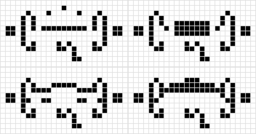
On period-43 glider gun, the gun immediately disappears in generation 1 and gives this weird reading when lv "identifies" it.
Screenshot 2025-02-20 092554.png (146.91 KiB) Viewed 4111 times
EDIT: this dissappearing act is happening on all other LV windows on the Wiki
Currently working to improve Life's guns and work on updating SKOPs and Isotropic rules most similar to B3/S23 to Life standards. Will get software to begin searches eventually.
WhiteHawk wrote: February 20th, 2025, 10:28 am
On period-43 glider gun, the gun immediately disappears in generation 1 and gives this weird reading when lv "identifies" it.
Screenshot 2025-02-20 092554.png
EDIT: this dissappearing act is happening on all other LV windows on the Wiki
Ok, but it says "Oscillator period 43." I also remember the bounding box being 507 x 510 and the population being between 296 and 362.
WhiteHawk wrote: February 20th, 2025, 10:28 am
On period-43 glider gun, the gun immediately disappears in generation 1 and gives this weird reading when lv "identifies" it.
Screenshot 2025-02-20 092554.png
EDIT: this dissappearing act is happening on all other LV windows on the Wiki
Seems fine to me. Please let me know which build you are using. The latest is 1245.
rowett wrote: February 20th, 2025, 11:53 am
Seems fine to me. Please let me know which build you are using. The latest is 1245.
I don't know, but the problem seems to be fixed
Currently working to improve Life's guns and work on updating SKOPs and Isotropic rules most similar to B3/S23 to Life standards. Will get software to begin searches eventually.
rowett wrote: February 20th, 2025, 11:53 am
Seems fine to me. Please let me know which build you are using. The latest is 1245.
I don't know, but the problem seems to be fixed
I was experiencing the bug as well, it was without a doubt linked to the Inverse theme triggering the Basic cell shader in an incomplete way, which has now been resolved.
confocaloid wrote: February 19th, 2025, 8:31 pmRule:Display256 exists, but the snippet now reports an error, probably due to missing rule lines in the section "@TABLE"?
x = 26, y = 1, rule = Display256
ABCDEFGHIJKLMNOPQRSTUVWXpApB!
[...][...]
I think this is a bug (judging by the semantics behind the RuleLoader implementation of ruletables).
An empty ruletable (one without any explicitly listed rules) defaults to "a cell always stays in the same state". That leads to a well-defined cellular automaton (even if maybe not a very "interesting" one, but still well-defined). Therefore an empty ruletable without any explicit rules should be accepted and correctly interpreted.
x = 26, y = 1, rule = Test204540
ABCDEFGHIJKLMNOPQRSTUVWXpApB!

@RULE Test204540
@TABLE
n_states:256
neighborhood:Moore
symmetries:none
127:1 B3/S234cUser:Confocal/R (isotropic CA, incomplete)
Unlikely events happen.
My silence does not imply agreement, nor indifference. If I disagreed with something in the past, then please do not construe my silence as something that could change that.
confocaloid wrote: February 19th, 2025, 11:50 pm
That oscillator can coexist with the standard spaceships and the glider 3736: two states, isotropic rules, range-2 weighted neighbourhood:
b-engine wrote: February 20th, 2025, 6:16 pm
When you advance or play the pattern just simply disappears. Bug only happens in HROT weighted neighborhood rules.
rowett wrote: February 20th, 2025, 11:53 am
Seems fine to me. Please let me know which build you are using. The latest is 1245.
I don't know, but the problem seems to be fixed
I was experiencing the bug as well, it was without a doubt linked to the Inverse theme triggering the Basic cell shader in an incomplete way, which has now been resolved.
Now it is happening again, but only with theme "Book"
EDIT: or just whenever you change the theme
Currently working to improve Life's guns and work on updating SKOPs and Isotropic rules most similar to B3/S23 to Life standards. Will get software to begin searches eventually.
#R B2ce/S1
bo$bo$o!
test test test
[[ COLOR BACKGROUND 255 255 255 COLOR ALIVE 88 28 123 COLOR ALIVERAMP 88 28 123 COLOR DEAD 255 255 255 COLOR DEADRAMP 255 255 255 ]]
This happens when a custom theme is set that ALIVE = ALIVERAMP and DEAD = DEADRAMP = BACKGROUND.
x = 3, y = 4, rule = ObviouslyNotB356S23:T200,200+1
.B$2BA$2BA$.B!
get_Snacked wrote: February 28th, 2025, 6:08 pm
this shifted torus, strangely, seemingly goes on forever endlessly with chaos on the left and right edges. does anyone know why?
x = 0, y = 0, rule = ObviouslyNotB356S23:T200,200+1
!
[[ RANDOMIZE ]]
Crossposting bugs when advancing selection and then evolving/stepping back the whole pattern:
confocaloid wrote: February 28th, 2025, 12:56 am
Steps to reproduce (build 1260): (edit: the bugs remain in build 1261)
Click "Show in viewer".
Enter selection mode (F4), and select the "top half" of the pattern's generation 0 (select all alive cells that are above the horizontal line dividing the pattern in half).
Advance the selected region by 4 ticks (Ctrl+Space four times).
The first bug: this step unexpectedly changes the current generation number from 0 to 4 (this is unlike in Golly, where advancing selection doesn't change the current generation number).
Run the changed pattern to generation 70.
Step back (Shift+Tab) one tick at a time.
The second bug: when stepping back from generation 70 in this way, around generation 61 or 62, most of the lower half of the pattern unexpectedly disappears. Continuing to step back "to the beginning" fails to restore either the original pattern or the pattern obtained by advancing selection four ticks.
x = 33, y = 31, rule = B3/S23
22bo$13b2o5b3o$14bo4bo$14bob2o2bo$15bo5bo$16bo3b2o$17bo2$10bo$2o3bo4b
2o$2o2b2o5b2o$5b2o4bo$6bo3bo6$22bo3bo$21bo4b2o$20b2o5b2o2b2o$21b2o4bo
3b2o$22bo2$15bo$11b2o3bo$11bo5bo$12bo2b2obo$13bo4bo$10b3o5b2o$10bo!
127:1 B3/S234cUser:Confocal/R (isotropic CA, incomplete)
Unlikely events happen.
My silence does not imply agreement, nor indifference. If I disagreed with something in the past, then please do not construe my silence as something that could change that.
confocaloid wrote: March 1st, 2025, 10:34 am
I think the following is a bug in LifeViewer (build 1261). Golly appears to process the pattern correctly.
Fixed in build 1262, thanks!
confocaloid wrote: March 1st, 2025, 10:34 am
Crossposting bugs when advancing selection and then evolving/stepping back the whole pattern
tommyaweosme wrote: March 1st, 2025, 6:13 pm
sometimes, the speed says its fast but right next to it it says its slow.
i learned via expirementation that if you turn off playback > throttle then it stops doing that
but then it lags! is this fixable or no. just wondering! :D
The Speed slider sets the number of generations per second target for pattern playback. If your machine is too slow to meet this target then by default LifeViewer will throttle the speed (to prevent lag) and display the actual speed attained.
If you switch off Settings>Playback>Throttle then LifeViewer will always process as many generations as are set by the Speed slider and so your machine may lag.
There's no fix for this other than a) get a faster device or b) wait for LifeViewer Pro since it's faster.