Page 43 of 178
Re: Pattern viewer for forum threads
Posted: August 21st, 2019, 6:50 am
by muzik
Also, lifehistory cells are incorrectly affected by layers:
Code: Select all
 x = 6, y = 1, rule = LifeHistory
ABCDEF!
[[ LAYERS 2 ]]
And hexagonal and triangular grids just don't work with it at all:
Code: Select all
 x = 20, y = 20, rule = Hex Life
3bo2b3o3bo2bo$5ob5o4bo3bo$o3bob2obo2b2o3b3o$b4o2b5o2b2o2b2o$o3bo4b2obo
$4ob2o2b2ob2ob4o$b2o3b4o2bobobob2o$o3bob2o4bo3b3o$2bobob3o3bo2b4o$b2o
2b5obobob2obo$bo2bo3b3obo3bo$3o2bo3bo2b2ob3obo$4bo2b7o3b2o$obobo2b2o2b
o2bob2o$2ob2ob2obo3b3o2b2o$8o2b2ob3ob2o$ob2o2bo2b3o4b4o$b4o4b2obo3b4o$
3bobo3b2ob3o4bo$2obobob9ob2o!
[[ LAYERS 2 ]]
Code: Select all
 x = 20, y = 20, rule = BSL
3bo2b3o3bo2bo$5ob5o4bo3bo$o3bob2obo2b2o3b3o$b4o2b5o2b2o2b2o$o3bo4b2obo
$4ob2o2b2ob2ob4o$b2o3b4o2bobobob2o$o3bob2o4bo3b3o$2bobob3o3bo2b4o$b2o
2b5obobob2obo$bo2bo3b3obo3bo$3o2bo3bo2b2ob3obo$4bo2b7o3b2o$obobo2b2o2b
o2bob2o$2ob2ob2obo3b3o2b2o$8o2b2ob3ob2o$ob2o2bo2b3o4b4o$b4o4b2obo3b4o$
3bobo3b2ob3o4bo$2obobob9ob2o!
[[ LAYERS 2 ]]
Inconsistencies with history layering: (also note that in Generations the back layer isn't darker)
Code: Select all
 x = 20, y = 20, rule = Life
3bo2b3o3bo2bo$5ob5o4bo3bo$o3bob2obo2b2o3b3o$b4o2b5o2b2o2b2o$o3bo4b2obo
$4ob2o2b2ob2ob4o$b2o3b4o2bobobob2o$o3bob2o4bo3b3o$2bobob3o3bo2b4o$b2o
2b5obobob2obo$bo2bo3b3obo3bo$3o2bo3bo2b2ob3obo$4bo2b7o3b2o$obobo2b2o2b
o2bob2o$2ob2ob2obo3b3o2b2o$8o2b2ob3ob2o$ob2o2bo2b3o4b4o$b4o4b2obo3b4o$
3bobo3b2ob3o4bo$2obobob9ob2o!
[[ LAYERS 2 ]]
Code: Select all
 x = 20, y = 20, rule = Frogs
3bo2b3o3bo2bo$5ob5o4bo3bo$o3bob2obo2b2o3b3o$b4o2b5o2b2o2b2o$o3bo4b2obo
$4ob2o2b2ob2ob4o$b2o3b4o2bobobob2o$o3bob2o4bo3b3o$2bobob3o3bo2b4o$b2o
2b5obobob2obo$bo2bo3b3obo3bo$3o2bo3bo2b2ob3obo$4bo2b7o3b2o$obobo2b2o2b
o2bob2o$2ob2ob2obo3b3o2b2o$8o2b2ob3ob2o$ob2o2bo2b3o4b4o$b4o4b2obo3b4o$
3bobo3b2ob3o4bo$2obobob9ob2o!
[[ LAYERS 2 ]]
I've also committed one new alias.
Re: Pattern viewer for forum threads
Posted: August 21st, 2019, 7:51 am
by muzik
Also, is it intended that pressing the small STOP button at the top middle doesn't turn it off? It definitely turns green when pressed, implying there's some sort of interaction, but I can't get it to turn off.
dvgrn wrote:Code: Select all
x = 3, y = 3, rule = MAPARYXfhZofugWaH7oaIDogBZofuhogOiAaIDogIAAgAAWaH7oaIDogGiA6ICAAIAAaIDogIAAgCCAAIAAAAAAAA
obo$obo$3o!
#C [[ STOP 18 ]]
Re: Pattern viewer for forum threads
Posted: August 21st, 2019, 10:45 am
by rowett
muzik wrote:Layers don't seem to be affected by cellborders.
Cell borders (and the grid lines if enabled) are only drawn on the bottom layer.
Re: Pattern viewer for forum threads
Posted: August 21st, 2019, 10:54 am
by rowett
muzik wrote:Also, lifehistory cells are incorrectly affected by layers
No it's correct. Marked states only appear in the bottom layer.
muzik wrote:And hexagonal and triangular grids just don't work with it at all
True, layers are only currently supported on square and offset square grids.
muzik wrote:Inconsistencies with history layering
What is the inconsistency?
muzk wrote:(also note that in Generations the back layer isn't darker)
This has been fixed for the next released build.
muzk wrote:I've also committed one new alias.
Great, thanks.
Re: Pattern viewer for forum threads
Posted: August 21st, 2019, 11:10 am
by rowett
muzik wrote:Also, is it intended that pressing the small STOP button at the top middle doesn't turn it off? It definitely turns green when pressed, implying there's some sort of interaction, but I can't get it to turn off.
The STOP and START buttons are indicators and can't be pressed. If I lock them they go grey so I may introduce another UI state that just prevents them getting highlighted when the mouse is over them.
EDIT: I've made them buttons.
Re: Pattern viewer for forum threads
Posted: August 22nd, 2019, 2:26 am
by rowett
Build 387 is now live on the
Forums and
LifeWiki
Please note: you will need to
refresh your browser to use the new build (Ctrl-F5 on Chrome)
Enhancements since the last released build:
- Generations rules now have brightness shading when using layers
- performance improvement for THEMEs without history
- added another alias
- START indicator now toggles AUTOSTART if defined
- hotkey Alt+"O" to toggle
- if START disabled when LOOP defined then playback stops when Loop happens at T=0
- STOP indicator now toggles STOP if defined
Fixes since the last released build:
- toggle LOOP when defined (hotkey Shift "P") wasn't working
- take screenshot (hotkey "O") was not working
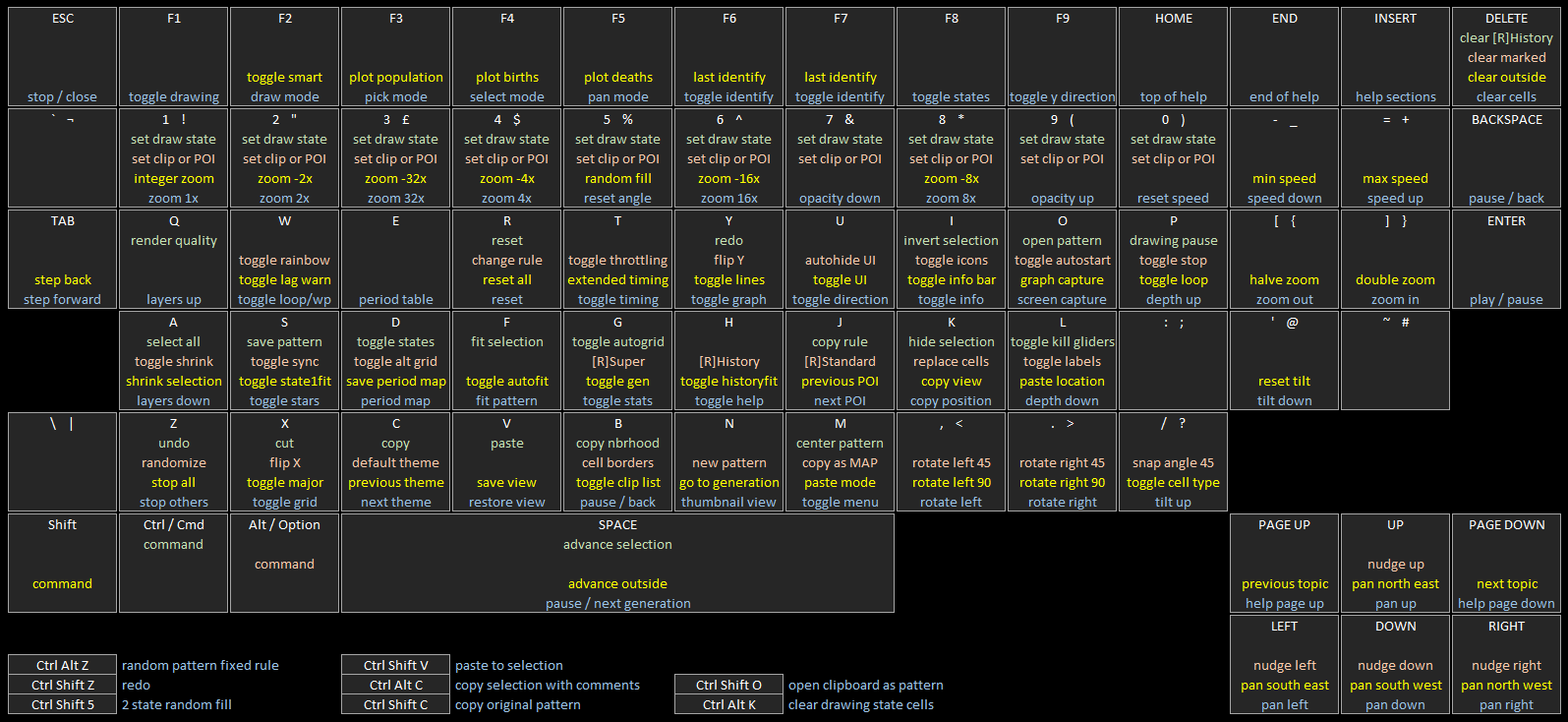
The updated hotkey map detailing the LifeViewer keyboard controls is
here.
Comments, feedback, suggestions and bug reports welcome!
Re: Pattern viewer for forum threads
Posted: August 23rd, 2019, 4:44 am
by rowett
Build 388 is now live on the
Forums and
LifeWiki
Please note: you will need to
refresh your browser to use the new build (Ctrl-F5 on Chrome)
Enhancements since the last released build:
- improved Settings menu
- settings are now grouped into topics
- new Rule button that prompts for a new rule
- clicking on a Theme that is already active just closes Theme selection
- reduced memory used by rules
The updated hotkey map detailing the LifeViewer keyboard controls is
here.
Comments, feedback, suggestions and bug reports welcome!
Re: Pattern viewer for forum threads
Posted: August 23rd, 2019, 4:47 am
by muzik
rowett wrote:muzik wrote:Also, lifehistory cells are incorrectly affected by layers
No it's correct. Marked states only appear in the bottom layer.
Still seems a bit odd to me that they display the alive colour though.
rowett wrote:muzik wrote:And hexagonal and triangular grids just don't work with it at all
True, layers are only currently supported on square and offset square grids.
Can the sliders be greyed out to indicate this?
rowett wrote:muzik wrote:Inconsistencies with history layering
What is the inconsistency?
From what I can see, on 2-state rules, the history cells only appear in the very back, whereas with generations they're duplicated across all other layers as with live cells.
Re: Pattern viewer for forum threads
Posted: August 23rd, 2019, 5:02 am
by rowett
muzik wrote:Can the sliders be greyed out to indicate this?
Yes this is fixed for the next released build.
muzik wrote:From what I can see, on 2-state rules, the history cells only appear in the very back, whereas with generations they're duplicated across all other layers as with live cells.
OK I'll fix it for the next build, thanks!
Re: Pattern viewer for forum threads
Posted: August 23rd, 2019, 6:01 am
by muzik
Here's some range-1 1D rule aliases from Mirek's site:
W54: Brownian motion
W110: Fishing-net (also Wolfram 110 according to Golly)
W22: Heavy triangles (also Wolfram 22 according to golly)
W90: Linear A
W150: Linear B
W18: Pascal's Triangle
W30: Randomizer 1 (also Wolfram 30 according to Golly)
W45: Randomizer 2
There's also plenty aliases for 1D binary rules with larger ranges, but unfortunately these aren't yet supported.
Re: Pattern viewer for forum threads
Posted: August 23rd, 2019, 11:01 am
by muzik
Can the Change Rule popup be made part of the viewer instead of as an external popup? And can aliases be selected somewhat similarly to in Golly?
Also, is it possible to download a copy of LifeViewer for offline usage (PC)? Currently there's no other program I know of that can simulate HROT (R>2) rules that doesn't require an internet connection.
Re: Pattern viewer for forum threads
Posted: August 23rd, 2019, 11:33 am
by dvgrn
muzik wrote:Also, is it possible to download a copy of LifeViewer for offline usage (PC)? Currently there's no other program I know of that can simulate HROT (R>2) rules that doesn't require an internet connection.
For offline use you can just save a copy of any Web page containing LifeViewer. It should work fine with no Internet connection. You can try editing the HTML to adjust things like the default canvas size, too -- sometimes it's nice to not be limited by LifeWiki or forum defaults.
There are simple examples
here of what minimal HTML for LifeViewer might look like.
Re: Pattern viewer for forum threads
Posted: August 23rd, 2019, 3:16 pm
by rowett
muzik wrote:Can the Change Rule popup be made part of the viewer instead of as an external popup? And can aliases be selected somewhat similarly to in Golly?
It's on the backlog.
muzik wrote:Also, is it possible to download a copy of LifeViewer for offline usage (PC)? Currently there's no other program I know of that can simulate HROT (R>2) rules that doesn't require an internet connection.
Yes you need two files:
Right click each one and "Save link as..."
Assuming you put
viewer.html in a folder called
muzik you then need to create a subfolder
muzik/js and put
lv-plugin.js there. You can then just open
viewer.html in your browser.
If you want the LifeViewer window to be bigger than the default 560x560 edit
viewer.html and change the line:
Code: Select all
<canvas width="560" height="560"></canvas>
Re: Pattern viewer for forum threads
Posted: August 24th, 2019, 1:36 am
by rowett
Build 389 is now live on the
Forums and
LifeWiki
Please note: you will need to
refresh your browser to use the new build (Ctrl-F5 on Chrome)
Enhancements since the last released build:
- added Wolfram aliases
- improved multi-state pattern Layers
Fixes since the last released build:
- LifeViewer window close button now works on Android/iOS
- locked Layers and Depth controls if hex or triangular grid
The updated hotkey map detailing the LifeViewer keyboard controls is
here.
Comments, feedback, suggestions and bug reports welcome!
Re: Pattern viewer for forum threads
Posted: August 24th, 2019, 8:24 am
by muzik
rowett wrote:
Fixes since the last released build:
- LifeViewer window close button now works on Android/iOS
This (and the offline copy of the viewer) works fantastically!
Randomizer 2 seems to be missing a W in the aliases screen though, so that should probably be fixed. And the 1D aliases in general are not alphabetically sorted.
Random thought: is there/will there be an option to change the colour of help text and the like through scripting?
Re: Pattern viewer for forum threads
Posted: August 24th, 2019, 12:23 pm
by rowett
muzik wrote:Randomizer 2 seems to be missing a W in the aliases screen though, so that should probably be fixed. And the 1D aliases in general are not alphabetically sorted.
Fixed, thanks.
muzik wrote:Random thought: is there/will there be an option to change the colour of help text and the like through scripting?
Not as script commands. I've been debating adding preferences which would persist across sessions.
Re: Pattern viewer for forum threads
Posted: August 24th, 2019, 4:27 pm
by muzik
Can opening the settings menu be made to lock the gameplay so you can't scroll or draw on the pattern, like what happens with the help menu?
Re: Pattern viewer for forum threads
Posted: August 25th, 2019, 1:58 am
by rowett
Build 390 is now live on the
Forums and
LifeWiki
Please note: you will need to
refresh your browser to use the new build (Ctrl-F5 on Chrome)
Enhancements since the last released build:
- disable drawing, selecting and panning while Settings displayed
Fixes since the last released build:
- fixed a graphical glitch for THEMEs with no history at STEP > 1
- corrected and ordered Wolfram aliases
The updated hotkey map detailing the LifeViewer keyboard controls is
here.
Comments, feedback, suggestions and bug reports welcome!
Re: Pattern viewer for forum threads
Posted: August 25th, 2019, 10:27 am
by muzik
The locking seems to work. can it also darken the pattern slightly like the Help menu does?
Re: Pattern viewer for forum threads
Posted: August 25th, 2019, 11:42 am
by rowett
muzik wrote:Can it also darken the pattern slightly like the Help menu does?
Yes
Re: Pattern viewer for forum threads
Posted: August 25th, 2019, 4:45 pm
by muzik
The lifeviewer window can get occluded by the post reply button set the bottom of the page, I'm not sure if that's the fault of the viewer itself though.
Similar stuff happens over at Catagolue.
Re: Pattern viewer for forum threads
Posted: August 26th, 2019, 2:16 am
by rowett
Build 391 is now live on the
Forums and
LifeWiki
Please note: you will need to
refresh your browser to use the new build (Ctrl-F5 on Chrome)
Enhancements since the last released build:
- dim screen when Settings menu displayed
Fixes since the last released build:
- ensure window appears above other page elements
The updated hotkey map detailing the LifeViewer keyboard controls is
here.
Comments, feedback, suggestions and bug reports welcome!
Re: Pattern viewer for forum threads
Posted: August 27th, 2019, 5:17 am
by rowett
Build 392 is now live on the
Forums and
LifeWiki
Please note: you will need to
refresh your browser to use the new build (Ctrl-F5 on Chrome)
Enhancements since the last released build:
- performance improvement for editing tasks for 2-state Life-like and [R]History patterns
Fixes since the last released build:
- fixed an issue where rotate selection could be incorrect when grid grew
The updated hotkey map detailing the LifeViewer keyboard controls is
here.
Comments, feedback, suggestions and bug reports welcome!
Re: Pattern viewer for forum threads
Posted: August 31st, 2019, 11:30 am
by rowett
Build 393 is now live on the
Forums and
LifeWiki
Please note: you will need to
refresh your browser to use the new build (Ctrl-F5 on Chrome)
Enhancements since the last released build:
- added experimental support for 2-state Margolus rules
- rule format is Mn0,n1,n2,n3,n4,n5,n6,n7,n8,n9,n10,n11,n12,n13,n14,n15
- where n0 to n15 are integers from 0 to 15
- also supports MS,Dn0;n1;n2;n3;n4;n5;n6;n7;n8;n9;n10;n11;n12;n13;n14;n15 format
- bounded grids and alternate rules are allowed
- rules where n0 = 15 and n15 = 0 are replaced with equivalent rules that don't strobe
- rules where n0 > 0 are not allowed apart from the case above
- using [[ GRIDMAJOR ]] creates a custom Theme
The updated hotkey map detailing the LifeViewer keyboard controls is
here.
Comments, feedback, suggestions and bug reports welcome!
Re: Pattern viewer for forum threads
Posted: August 31st, 2019, 5:37 pm
by muzik
Exciting new developments I see!
Will higher-range Margolus rules be supported? These (or at least an isotropic outer-totalistic subset thereof) could be allowed simply by letting the range parameter in LtL/HROT be a half-integer. WolframAlpha allows half-integer ranges for 1D rules, and Margolus rules are basically just the 2D equivalents of these.
https://www.wolframalpha.com/input/?i=r ... ange+1%2F2
Also, since this is just an early build: will these ever display like true block cellular automata do?