

The colours are very close. I'll make the difference a little more prominent in the next build.Saka wrote:Ok, they do show, but the colors are so barely different I cant tell the difference
Pattern viewer for forum threads
Re: Pattern viewer for forum threads
LifeViewer https://lazyslug.com/lifeviewer LifeViewer Pro https://lazyslug.com/lifeviewer/pro
BeebLife https://lazyslug.com/beeblife
BeebLife https://lazyslug.com/beeblife

Re: Pattern viewer for forum threads
I suspect there is a subtle interaction with PASTE that sometimes affects reversibility. I haven't investigated enough to reproduce it, but to explain how it matters, consider this use case:
(1) Start running a complex reversible Margolus pattern. (2) Run in reverse (everything's fine) (3) Repeat forward run and tweak a few cells (4) Run in reverse (now you may get something random looking instead of the initial state) (5) Run forward to the tweak generation. (6) Fix the problem. (7) Run in reverse (we should get the initial state, but actually it's messed up).
So here is my guess: pasting in a pattern is irreversible if you are overwriting cells. This isn't a big problem for the most part because if the pattern is working normally, you are only pasting into empty cells. But the reverse run after a tweak (4) may cause a cell to appear in an overwrite position. At that point, the reverse PASTE may remove the cell, and will change the state of the pattern thereafter.
There's an XOR paste, right? Let me see if I can get that to work. It should solve the reversibility issue. Alternatively, a history of which cells are overwritten would fix it for all paste modes, but I am not sure it's worth the effort. (However, I have a pattern of overlaying the PASTE on top of the first glider in my pattern, because it's easy to find the cell coordinates, but that's easily fixable.)
UPDATE: Here's a specific case (moved to a later posting)
(1) Start running a complex reversible Margolus pattern. (2) Run in reverse (everything's fine) (3) Repeat forward run and tweak a few cells (4) Run in reverse (now you may get something random looking instead of the initial state) (5) Run forward to the tweak generation. (6) Fix the problem. (7) Run in reverse (we should get the initial state, but actually it's messed up).
So here is my guess: pasting in a pattern is irreversible if you are overwriting cells. This isn't a big problem for the most part because if the pattern is working normally, you are only pasting into empty cells. But the reverse run after a tweak (4) may cause a cell to appear in an overwrite position. At that point, the reverse PASTE may remove the cell, and will change the state of the pattern thereafter.
There's an XOR paste, right? Let me see if I can get that to work. It should solve the reversibility issue. Alternatively, a history of which cells are overwritten would fix it for all paste modes, but I am not sure it's worth the effort. (However, I have a pattern of overlaying the PASTE on top of the first glider in my pattern, because it's easy to find the cell coordinates, but that's easily fixable.)
UPDATE: Here's a specific case (moved to a later posting)
Last edited by pcallahan on September 27th, 2019, 1:32 pm, edited 1 time in total.
Re: Pattern viewer for forum threads
Would be great to have a reproducible set of steps and example patternpcallahan wrote:I suspect there is a subtle interaction with PASTE that sometimes affects reversibility.

Yes.pcallahan wrote:There's an XOR paste, right?
[[ PASTEMODE OR|COPY|XOR|AND|NOT ]] sets the mode for subsequent PASTE commands.
You can use the start parameter of PASTET EVERY to delay the first paste.pcallahan wrote:I have a pattern of overlaying the PASTE on top of the first glider in my pattern, because it's easy to find the cell coordinates, but that's easily fixable.
[[ PASTET EVERY interval (start (end)) ]]
For example if the period is 64 generations you could use:
[[ PASTET EVERY 64 64 ]]
i.e. Paste every 64 generations starting at generation 64.
LifeViewer https://lazyslug.com/lifeviewer LifeViewer Pro https://lazyslug.com/lifeviewer/pro
BeebLife https://lazyslug.com/beeblife
BeebLife https://lazyslug.com/beeblife
Re: Pattern viewer for forum threads
Maybe we crossed signals on my update, but to repeat:rowett wrote: Would be great to have a reproducible set of steps and example pattern
This pattern reflects a stream of gliders transparently back into itself. (1) Run in 200 generations. (2) Remove the cell at (10, 0) (3) Run it backwards 200 generations (observe different behavior because of the change) (4) Run it forwards 200 generations. The pattern is chaotic-looking and does not look like (2).
Code: Select all
x = 10, y = 5, rule = critters
#C [[ RLE input o$bo$bo$o! ]]
#C [[ PASTET EVERY 32 ]]
#C [[ PASTE input -11 0 ]]
$bo$2bo6bo$2bo6bo$bo!
Code: Select all
x = 10, y = 5, rule = critters
#C [[ RLE input o$bo$bo$o! ]]
#C [[ PASTEMODE XOR ]]
#C [[ PASTET EVERY 32 ]]
#C [[ PASTE input -11 0 ]]
$bo$2bo6bo$2bo6bo$bo!
Re: Pattern viewer for forum threads
Yes the PASTEs are interefering with the stream of gliders after the change.pcallahan wrote:This pattern reflects a stream of gliders transparently back into itself. (1) Run in 200 generations. (2) Remove the cell at (10, 0) (3) Run it backwards 200 generations (observe different behavior because of the change) (4) Run it forwards 200 generations. The pattern is chaotic-looking and does not look like (2).
I think XOR makes it more likely you won't get interference but it doesn't guarantee it. I suspect the best way might be to have LifeViewer suspend PASTE EVERY commands until the current maximum generation has been reached.pcallahan wrote:I believe I can sometimes reproduce this in the XOR case, but other times everything reverses as expected.
In your example above this would mean:
- Run in 200 generations (PASTE EVERY is enabled)
- Remove the cell at (10, 0)
- Run it backwards 200 generations (PASTE EVERY is suspended since generation is < maximum seen of 200)
- Run it forwards 200 generations (PASTE EVERY is still suspended)
- Continue running forwards (PASTE EVERY is enabled since generation is now the new maximum)
This shouldn't make any difference since they both use the same function.pcallahan wrote:There may be a difference in the controls I'm using (e.g. run or single-step).
LifeViewer https://lazyslug.com/lifeviewer LifeViewer Pro https://lazyslug.com/lifeviewer/pro
BeebLife https://lazyslug.com/beeblife
BeebLife https://lazyslug.com/beeblife
Re: Pattern viewer for forum threads
Another comment (and again, this might be a personal preference, not a bug). I find the interaction of single-step and reverse-playback confusing. I can see that single step is relative to the playback direction, which is logical, but I find it counterintuitive. On top of that, I find it confusing that next-step respects generations-per-step but previous-step always backs up by one step. That might be potentially useful, but when I am stepping back and forth on a reversible pattern, it involves a lot of mental context switching for me. I just expect to be able to single-step back and forth.
Re: Pattern viewer for forum threads
OK I'll switch the next and previous step buttons for reverse playback.pcallahan wrote: I find the interaction of single-step and reverse-playback confusing. I can see that single step is relative to the playback direction, which is logical, but I find it counterintuitive.
I'll make them both respect the current generations-per-step setting.pcallahan wrote:I find it confusing that next-step respects generations-per-step but previous-step always backs up by one step.
LifeViewer https://lazyslug.com/lifeviewer LifeViewer Pro https://lazyslug.com/lifeviewer/pro
BeebLife https://lazyslug.com/beeblife
BeebLife https://lazyslug.com/beeblife
Re: Pattern viewer for forum threads
Build 414 is now live on the Forums and LifeWiki
Please note: you will need to refresh your browser to use the new build (Ctrl-F5 on Chrome)
Enhancements since the last released build:
Comments, feedback, suggestions and bug reports welcome!
Please note: you will need to refresh your browser to use the new build (Ctrl-F5 on Chrome)
Enhancements since the last released build:
- Margolus enhancements
- made gridline colours more distinct
- Step Forward and Step Back controls are reversed during reverse playback
- Step Back now respects generations-per-step setting
- hotkeys Tab and Shift+Tab step forward and back generations-per-step generations
- hotkeys Space and "B" step forward and back one generation
- [[ PASTE EVERY ]] is disabled when current generation is less than maximum generation reached
- maximum generation reached is zeroed on Reset
Comments, feedback, suggestions and bug reports welcome!
LifeViewer https://lazyslug.com/lifeviewer LifeViewer Pro https://lazyslug.com/lifeviewer/pro
BeebLife https://lazyslug.com/beeblife
BeebLife https://lazyslug.com/beeblife
Re: Pattern viewer for forum threads
Build 415 is now live on the Forums and LifeWiki
Please note: you will need to refresh your browser to use the new build (Ctrl-F5 on Chrome)
Enhancements since the last released build:
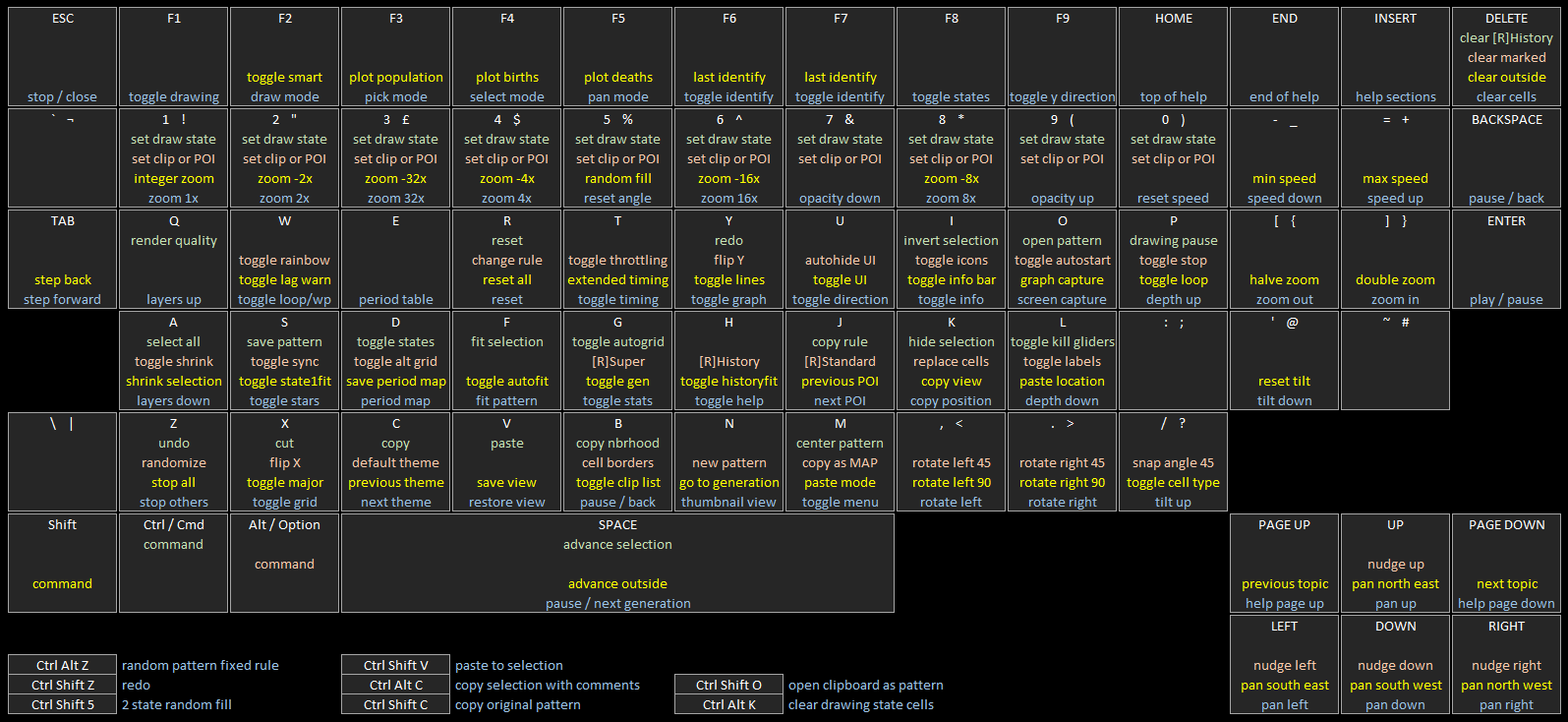
The updated hotkey map detailing the LifeViewer keyboard controls is here.
Comments, feedback, suggestions and bug reports welcome!
Please note: you will need to refresh your browser to use the new build (Ctrl-F5 on Chrome)
Enhancements since the last released build:
- new button Settings->Pattern->Randomize (hotkey Alt+"Z") which creates a random 64x64 pattern with a random rule
- the rule is based on the current rule family
- the rule will have the same number of states and neighbourhood as the original rule
Code: Select all
x = 64, y = 64, rule = B01346/S23
b2obo3b6ob3o2b3ob3o2bob2o2bo2b6obo2b5ob2ob4obo$2b4obob2obob2ob3o2b3ob
2o6b2o2b2o2bob3obob5ob2o3b3o$o3bo4b4o2b3o2b2ob2obob2ob7obobobob2o3b2o
bobo2bo$ob2ob5o2bob2obo2b2o5bobo2bobo2b6ob2obo3bobobo3bob2o$obo2bobo2b
o6b3o3b2o6b3obobobo2b5o2bob2obob3o$2o3bo3b2ob2obob4o2b2obo3b2o4b2o2b2o
2b2o2b2obo2b2o4b4o$2b3obo2b3ob3o3bobob4o2bob8ob6o6bob2ob2o3b2o$2b2ob2o
bo2bobo5b2o3bo4bo2bob2o4b3obob4ob3o3b4ob2o$bobob2ob2ob2ob6obo6b4ob2ob
o2bobob2o5b4o2bo4bo$o4bo2bobo2bobobob2o2bo3bo2bobo2b4o8b4o2bo4b2o2b2o
$bobobob9ob2ob5obob2ob4o2b5o2b2ob3o2b5o2bo3bo$b4obobo3b6o2bo2b10o2bob
obo2b2obo2b2ob2o5bo3b2o$o2b2ob3obo2b4o9b4ob4o4bobo2bobobo2b2ob3o2b2ob
o$2ob2ob2obo3b4ob2obobobobo3b2o3bo3b8o5bob2obo2b3o$3obob2obo2bobo6b3o
4b2o2bo2b2obo3b2ob3o2b3o2b2ob2o2b2o$3obo2bo3b3o3bo5b2o5b2obo3bo2b3o2b
obo3b5ob2obo2bo$2o3bo2bobob3obob2o2b3o3b3obo4bob2ob3o3bobob2obob3o2b2o
$b4o2bob9obo2bo2bo2b2obob2o2bo3bobo2bob3o3b3obob2o$bo3b2obob3obo2b3o2b
2obob2o3bo2b3obo6b4o2b6obo2bo$4obobo2b2o2b2o2bo4b3o2b2ob2obo3b3ob3ob6o
b7ob3o$4obo2b3obob2o4bobob2o3b6ob4o4b5obob3o2bob3o$ob3o4b4obo2b3ob2o3b
o4b2o2b2obobo2b4o2b3obobo3b2ob2o$o2bobob2o2b2ob4ob2o3bo2b6ob4ob4ob2o4b
obobobobobob2o$4b2o5bob2obo3b2o2bo3b3o3bobobo2b2o2b3obo3b2o4bo3bo$o2b
4ob4o2bobob4o3bo2bob2ob3o3bo2b4o3b2ob2obo2bo4bo$2b4obobobo2bo3bob2o4b
ob4ob4ob3ob2obo2b2ob4o2bobob3o$2o2b2ob2obob5o4bobo2bob2obob2o2bo3b2ob
o5bobo6b3o$ob2ob3obobo2b2o2b2o2b3ob2obo2b9ob2ob4ob2obobob6o$3bob4o5bo
bo6bo2b2o2b2obo2bo7b3o2b3ob5obo2bo$2o3bobo6b2obo2bobobo4bo3bobobo3b4o
4b5o3b2ob4o$2ob2obo4bo3b2o3bo2b2obob2o2b2obo4bo2b2ob2o2bo3b2o4b4o$b2o
bobobo4b2ob2obo2bobo2bobo3bobob6o2b3o2bo3bobob2ob2o$2o2bobo4bob2o3bo2b
ob2o3bobob2obobo2bo3bob5ob3o3bo2b2o$4o3bo4bo3bo3b4o2b2o2bob3obo3b3o2b
o3bob3o4bob4o$2o4b4ob2o2bob3o4b9obobob3ob2o2b2o4b2obobob4o$3b6o2b4o4b
o2b2o2bobo3b2obo3b3o2bo2b2ob2o3b2obobo2bo$2b3o3bob3ob2obob2o2b3o3b2ob
6obo2bo2b5obob3o3bo2b2o$3b3obob2obobobobob3o2bo3b3obobobob5ob2ob2ob2o
5b2ob2o$obobo5b2o3b2obob2o2b4ob3ob2obo4b2ob2obob2ob2ob3obo$bob4o2bo3b
o3bob3ob2ob3o4b2ob3ob2o3bo3b3ob5ob2ob2o$3ob2obo2b2ob2obo3bo3b3o6bo2bo
2bo6bo2b2o2bobobo$b4o3bo2bobobo3b2ob2ob2o2b2obo3bo3bo2bob3ob3o3b5obo$
2b2obob2obob2ob3o3b5ob3o2b2o4bob3o3bobo2bobo4bob2obo$2ob2ob4obo2bo2bo
b2ob4obo2b2o2b2ob3o6b2o3b8o4bo$4ob2o3b7o4b5o3b2ob3obob3o2bo3bo2b4obob
obob3o$2b4ob2obo2b2o4bobobo4b2ob3obo2b2obo2bo2b2o2bobo2b5ob2o$o4b2ob3o
b2ob4o2b2ob2o3bob2o5b2ob2o2bob3obobo2b2obo3bo$bob2o4bo2bo3bob4ob2o3b2o
2bobo2bobob3o3b2o3b2obo2bo4bo$2ob3o5bob5o2bo2b4o4b3obob2o2bobo3b3obob
2ob3o4bo$2b2ob4obobo2b5o4b3o3b3ob4o7b3o2b3obo2b5o$2bo2b3ob2obo9bo3bo4b
o4bob3ob2o2b2obo2bobo2bo4b2o$2o2b2o5b2obobo5bo4bo4bob4o5b4o4bo2b3ob3o
b2o$3o2bob9ob2ob4o2b4obo7bo2bob4obo2bo2bo2b2ob2o$2b2ob3o2b7ob2ob2o2bo
bo3b2o2b2o4b3o5b3ob3o2bo2b2o$b4o4bo2bo5bob2ob2o2b2o2bo6b3o4bob5o5bo5b
o$2bob2o2b2ob3obo3bo2b3o2b6o5b4obobo5bobo2b3ob4o$obob5o3b4ob2ob2obobo
b2o3b6obo2bob2o4bob4o2b2o$b2o3bo4b4o3bo4b2o3b3o4b3ob2obobo2b5o5b2o2b3o
$obo2bobobob3o3bobo2bo2b2o5b2o2bob2ob2ob2obob3ob3ob4o$2o2b3o2b3o2b2ob
o2bob3obo2b3o3bob3obo2b2o2bo2b2o2b3obobobo$bob4o3b3o3b2obob2obo3b2obo
bob4o2bo6bob2o6bobobo$3o3bo4b3o2b3ob2obo3b2obob6o5bob3ob3o2bo3b2obo$3b
obo2b2o3bobo4bo7b3o2bobobobo2bo2bo2b3obo5b2o3bo$4obob2o2bo2bo2bo2bo3b
2obo2b2obobo2b2o2b3o2bobo4b4o2bo!
[[ AUTOFIT AUTOSTART TITLE "#A" ]]Comments, feedback, suggestions and bug reports welcome!
LifeViewer https://lazyslug.com/lifeviewer LifeViewer Pro https://lazyslug.com/lifeviewer/pro
BeebLife https://lazyslug.com/beeblife
BeebLife https://lazyslug.com/beeblife

Re: Pattern viewer for forum threads
Do LTL and HROT use the same algorithm in LifeViewer, and will an option be added to switch between different algorithms for running rules (and will QuickLife/HashLife ever be supported)?
Parity Replicator Collection v1.6 is now live - please send all relevant discoveries here.
Re: Pattern viewer for forum threads
Yesmuzik wrote:Do LTL and HROT use the same algorithm in LifeViewer
There's no need at the moment since there's only one algo per rule family.muzik wrote:... will an option be added to switch between different algorithms for running rules
- 2-state range 1 rules use a tile-based algo with 4 cell array lookup supporting:
- Wolfram
- Moore
- von Neumann
- Hexagonal
- MAP
- 2-state range 1 Triangular neighbourhood rules use a variant of algo 1
- Margolus neighbourhood rules use another variant of algo 1
- [R]History rules use algo 1 (or 2 for Triangular) with pre and post processing to deal with state 6
- states 3-5 are handled by the renderer
- History and longevity is a post processing step
- Generations rules use algo 1 (or 2) and then a variant of the History post processing step
- HROT/LtL rules use a different algo with 2 variants: 2 state and multi-state
I won't support QuickLife since the current algo is similar.muzik wrote: and will QuickLife/HashLife ever be supported)?
HashLife is possible but not a priority.
LifeViewer https://lazyslug.com/lifeviewer LifeViewer Pro https://lazyslug.com/lifeviewer/pro
BeebLife https://lazyslug.com/beeblife
BeebLife https://lazyslug.com/beeblife
Re: Pattern viewer for forum threads
Can the generation number also be made to display in the T menu, and not be abridged at large values?
Code: Select all
#CXRLE Pos=-12,-6 Gen=99990
x = 11, y = 10, rule = R5,C0,M1,S34..53,B31..42,NM
3b4o$2bo2b4o$bo4b5o$2o5b4o$2o5b4o$b2o3b5o$2b8o$2b7o$3b5o$4b3o!
Parity Replicator Collection v1.6 is now live - please send all relevant discoveries here.
Re: Pattern viewer for forum threads
I'll take a look.muzik wrote:Can the generation number also be made to display in the T menu, and not be abridged at large values?
LifeViewer https://lazyslug.com/lifeviewer LifeViewer Pro https://lazyslug.com/lifeviewer/pro
BeebLife https://lazyslug.com/beeblife
BeebLife https://lazyslug.com/beeblife
Re: Pattern viewer for forum threads
Build 416 is now live on the Forums and LifeWiki
Please note: you will need to refresh your browser to use the new build (Ctrl-F5 on Chrome)
Enhancements since the last released build:
The random rule has a 50% chance of B2, B3 or B4 (no other B values allowed) and a 25% chance of any survival condition.
View the pattern and then press Alt+"Z" to randomize:
The updated hotkey map detailing the LifeViewer keyboard controls is here.
Comments, feedback, suggestions and bug reports welcome!
Please note: you will need to refresh your browser to use the new build (Ctrl-F5 on Chrome)
Enhancements since the last released build:
- new script commands to customize the Randomize pattern generator
- [[ RANDSEED <string> ]] sets the random seed (so you can have the same random pattern each time)
- [[ RANDWIDTH <1..1024> ]] sets the width of the randomly generated pattern (default is 64)
- [[ RANDHEIGHT <1..1024> ]] sets the height of the randomly generated pattern (default is 64)
- this is fixed at 1 for Wolfram patterns
- [[ RANDFILL <1..100> ]] sets the random fill percentage for the pattern (default is 50)
- new script commands to customize the Randomzie rule generator
- Life-like rules:
- [[ RANDCHANCE item <0..100> ]] - set percentage chance of item being generated
- item can be:
- ALL - all birth and survival conditions
- B - all birth conditions
- S - all survival conditions
- B<0..n> - specific birth condition
- S<0..n> - specific survival condition
- random chance defaults to 50 for all conditions except B0 which defaults to 25
- Margolus rules:
- [[ RANDREVERSIBLE ]] generate a reversible rule
- [[ RANDFIXEDPOP ]] generate a fixed population rule
- Life-like rules:
The random rule has a 50% chance of B2, B3 or B4 (no other B values allowed) and a 25% chance of any survival condition.
View the pattern and then press Alt+"Z" to randomize:
Code: Select all
x = 1, y = 1, rule = Life
b!
[[ RANDWIDTH 32 RANDHEIGHT 96 RANDFILL 25 ]]
[[ RANDCHANCE B 0 ]]
[[ RANDCHANCE B2 50 RANDCHANCE B3 50 RANDCHANCE B4 50 ]]
[[ RANDCHANCE S 25 ]]
[[ AUTOFIT AUTOSTART TITLE "#A" ]]Comments, feedback, suggestions and bug reports welcome!
LifeViewer https://lazyslug.com/lifeviewer LifeViewer Pro https://lazyslug.com/lifeviewer/pro
BeebLife https://lazyslug.com/beeblife
BeebLife https://lazyslug.com/beeblife
Re: Pattern viewer for forum threads
Opening this seems to either lag out the browser a lot or cause the page to reload, again on safari. I haven't tested on desktop but wouldn't be surprised if it fares better.
Code: Select all
#CXRLE Pos=-8150,-6 Gen=99990
x = 11, y = 10, rule = R5,C0,M1,S34..53,B31..42,NM
3b4o$2bo2b4o$bo4b5o$2o5b4o$2o5b4o$b2o3b5o$2b8o$2b7o$3b5o$4b3o!
Parity Replicator Collection v1.6 is now live - please send all relevant discoveries here.
Re: Pattern viewer for forum threads
Placing the pattern at that offset means LifeViewer created the largest grid (8192x8192) and equivalent memory for the algo. If your mobile device doesn't have much RAM it will probably struggle.muzik wrote:Opening this seems to either lag out the browser a lot or cause the page to reload, again on safari. I haven't tested on desktop but wouldn't be surprised if it fares better.
It works fine on my desktop machine.
LifeViewer https://lazyslug.com/lifeviewer LifeViewer Pro https://lazyslug.com/lifeviewer/pro
BeebLife https://lazyslug.com/beeblife
BeebLife https://lazyslug.com/beeblife
Re: Pattern viewer for forum threads
Build 417 is now live on the Forums and LifeWiki
Please note: you will need to refresh your browser to use the new build (Ctrl-F5 on Chrome)
Enhancements since the last released build:
Comments, feedback, suggestions and bug reports welcome!
Please note: you will need to refresh your browser to use the new build (Ctrl-F5 on Chrome)
Enhancements since the last released build:
- T button tooltip now shows generation
- Life ended notification wasn't always triggering correctly
- keep camera position when Life ends
- Randomize was discarding [R]History postfix
- Randomize was generating B0 for Generations rules
- ignore out of range [[ RANDCHANCE ]] specific birth or survival condition
Comments, feedback, suggestions and bug reports welcome!
LifeViewer https://lazyslug.com/lifeviewer LifeViewer Pro https://lazyslug.com/lifeviewer/pro
BeebLife https://lazyslug.com/beeblife
BeebLife https://lazyslug.com/beeblife
Re: Pattern viewer for forum threads
Randomising 2-state generations gives rules in the outer-totalistic 2-state family, shouldn't it instead be sticking with the generations algorithm?
Alternatively, could lifeviewer convert 2-state generations rulestrings into normal outer-totalistic ones instead before running them?
I'd also like if the unabridged T generation tooltip also showed in the T menu since it's hard to get it to show up on mobile devices.
Code: Select all
x = 39, y = 1, rule = 1/026/2
2bo3b3ob3ob3obobo2b3obo4bo2b3o!
I'd also like if the unabridged T generation tooltip also showed in the T menu since it's hard to get it to show up on mobile devices.
Parity Replicator Collection v1.6 is now live - please send all relevant discoveries here.
Re: Pattern viewer for forum threads
It doesn't make any difference. 2-state generations rules are run by the outer-totalistic 2-state algorithm.muzik wrote:Randomising 2-state generations gives rules in the outer-totalistic 2-state family, shouldn't it instead be sticking with the generations algorithm?
OKI'd also like if the unabridged T generation tooltip also showed in the T menu since it's hard to get it to show up on mobile devices.
LifeViewer https://lazyslug.com/lifeviewer LifeViewer Pro https://lazyslug.com/lifeviewer/pro
BeebLife https://lazyslug.com/beeblife
BeebLife https://lazyslug.com/beeblife
Re: Pattern viewer for forum threads
In which case, wouldn't it be a better idea to have the rule string displayed in the T menu formatted in outer-totalistic 2-state format as opposed to Generations, since the latter isn't in common conventional usage?rowett wrote: October 1st, 2019, 8:09 amIt doesn't make any difference. 2-state generations rules are run by the outer-totalistic 2-state algorithm.muzik wrote:Randomising 2-state generations gives rules in the outer-totalistic 2-state family, shouldn't it instead be sticking with the generations algorithm?
----
With the new site redesign the top bar of the viewer looks a bit broken.
Parity Replicator Collection v1.6 is now live - please send all relevant discoveries here.
-
fluffykitty
- Posts: 1178
- Joined: June 14th, 2014, 5:03 pm
- Contact:
Re: Pattern viewer for forum threads
Can confirm.muzik wrote: October 1st, 2019, 5:49 pmWith the new site redesign the top bar of the viewer looks a bit broken.
-
GUYTU6J
- Posts: 2200
- Joined: August 5th, 2016, 10:27 am
- Location: 拆哪!I repeat, CHINA! (a.k.a. 种花家)
- Contact:
Re: Pattern viewer for forum threads
- Screenshot_20191002_092450_com.android.browser.jpg (505.33 KiB) Viewed 6604 times
熠熠种花 - Glimmering Garden
Harvest Moon
2-engine p45 gliderless HWSS gun
Small p2070 glider gun
Forgive me if I withhold my enthusiasm.
Harvest Moon
2-engine p45 gliderless HWSS gun
Small p2070 glider gun
Forgive me if I withhold my enthusiasm.
Re: Pattern viewer for forum threads
Build 418 is now live on the Forums and LifeWiki
Please note: you will need to refresh your browser to use the new build (Ctrl-F5 on Chrome)
Enhancements since the last released build:
Comments, feedback, suggestions and bug reports welcome!
Please note: you will need to refresh your browser to use the new build (Ctrl-F5 on Chrome)
Enhancements since the last released build:
- add generation to T menu
- fixed LifeViewer title bar on new forum
Comments, feedback, suggestions and bug reports welcome!
LifeViewer https://lazyslug.com/lifeviewer LifeViewer Pro https://lazyslug.com/lifeviewer/pro
BeebLife https://lazyslug.com/beeblife
BeebLife https://lazyslug.com/beeblife
-
GUYTU6J
- Posts: 2200
- Joined: August 5th, 2016, 10:27 am
- Location: 拆哪!I repeat, CHINA! (a.k.a. 种花家)
- Contact:
Re: Pattern viewer for forum threads
Oh, I forget that the help button is on the top as usual. For my previous comment I meant I don't see the gear-shaped settings button. Also, for build 418, the problem that its image is in a low quality on mobile phone has not been fixed yet.
熠熠种花 - Glimmering Garden
Harvest Moon
2-engine p45 gliderless HWSS gun
Small p2070 glider gun
Forgive me if I withhold my enthusiasm.
Harvest Moon
2-engine p45 gliderless HWSS gun
Small p2070 glider gun
Forgive me if I withhold my enthusiasm.
Re: Pattern viewer for forum threads
OK I see the issue, thanks for reporting.GUYTU6J wrote: October 2nd, 2019, 1:28 am Also, for build 418, the problem that its image is in a low quality on mobile phone has not been fixed yet.
LifeViewer https://lazyslug.com/lifeviewer LifeViewer Pro https://lazyslug.com/lifeviewer/pro
BeebLife https://lazyslug.com/beeblife
BeebLife https://lazyslug.com/beeblife