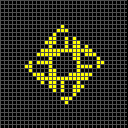
Sometimes, when loading patterns in a newly opened popup viewer, the initial size will be considerably smaller than the enforced minimum size, and intersection occurs between UI elements. Popup viewers smaller than the minimum permitted dimensions should not be allowed, and should always open at the minimum size even if somehow specified to be smaller, or whatever is causing it here (loading from a thumbnail of something with an invalid bounded grid definition).

- IMG_8464.jpeg (182.29 KiB) Viewed 628 times
I've tested this on multiple devices so I hope this setup is universal: Use Select All on this, and you'll see that the selection box is offset to the left by a pixel or so. The paste box is much the same.
Code: Select all
x = 20, y = 20, rule = B3/S23:T20,20
10$10bo9$19bo!
[[ ZOOM 22 ]]
Why are some of the cell borders wonky here? The angle is exactly 45 degrees and the zoom is power-of-two integer level, so I'd expect perfect diagonal lines, but every so often there's a kink where two pixels end up orthogonally adjacent.
Code: Select all
x = 23, y = 23, rule = B/S01234V
15bo$14b3o$13b5o$12b7o$11b9o$10b11o$9b13o$8b15o$7b15o$6b15o$5b15o$4b15o
$3b15o$2b15o$b15o$15o$b13o$2b11o$3b9o$4b7o$5b5o$6b3o$7bo!
[[ CELLBORDERS ANGLE 45 ZOOM 32 THEME Mono ]]
Despite the period and frequency maps having an outer border of black cells, the color for these boundary cells is not listed anywhere in Help > Info > Identify.
Code: Select all
x = 7, y = 5, rule = B2in3/S123a
bo$o4bo$bo3bo$bo4bo$5bo!
[[ AUTOIDENTIFY ]]
Compare:
Code: Select all
x = 7, y = 5, rule = B2in3/S123a:P7
bo$o4bo$bo3bo$bo4bo$5bo!
[[ AUTOIDENTIFY ]]
These commands do not appear to do anything. If not valid for these rulespaces I'd expect a "not valid for this rule" error message to be displayed.
EDIT: added missing COLOR commands in response to a now-deleted question by confocaloid
Code: Select all
x = 3, y = 3, rule = B3/S23Super
o$obo$2o!
[[ COLOR dead 255 255 255 ]]
Code: Select all
x = 3, y = 3, rule = B3/S23Investigator
o$obo$2o!
[[ COLOR dead 255 255 255 ]]
Overwritten shader error messages capitalize the second mentioned shader, but overwritten theme error messages do not capitalize the second mentioned theme. Which of these is correct?
Code: Select all
x = 3, y = 3, rule = B3/S23
2bo$obo$b2o!
[[ SHADER Rainbow SHADER Neighbour ]]
Code: Select all
x = 3, y = 3, rule = B3/S23
2bo$obo$b2o!
[[ THEME Yellow THEME Red ]]
If we turn on State Number, then mouse over the black cells to the right of the gray boundary cells, they display "[bounded] 0", rather than the usual "[bounded] 255". I assume this is expected behaviour as they're not currently in a loaded state?
Code: Select all
x = 2, y = 4, rule = B2/S:P0,4
o$bo$bo$o!
[[ X 256 ]]
When scrolling through the periods table manually (i.e. click and drag, or touchscreen), it's possible to position things just right so that both the up arrow and down arrow are lit up and usable, even though the table is only one entry too long to display everything, and therefore technically should only ever be in a state where one arrow is usable at a time? (An optimization for Identify in reversible rules would be convenient for this test case.)
Code: Select all
x = 5, y = 42, rule = M0,2,1,12,4,5,6,7,8,9,10,11,3,13,14,15
$bo2bo$2b2o3$bo2bo$2b2o3$bo2bo$2b2o3$bo2bo$2b2o3$bo2bo$2b2o3$bo2bo$2b
2o3$bo2bo$2b2o3$bo2bo$2b2o3$bo2bo$2b2o3$bo2bo$2b2o3$bo2bo!
[[ AUTOIDENTIFY COLOR UIBACKGROUND Green ]]
Are bounded grid edge cells handled as state 255 in all rulespaces, or only 2-state rulespaces?